Building a Production Data Analysis Agent
Build a data analysis agent that turns natural language into SQL, runs queries against a database, and returns insights using LangGraph, FastAPI, Redis, LiteLLM, and MCP. Everything runs locally via Docker Compose.
TL;DR
- Natural language to SQL agent backed by a sample e-commerce database
- LangGraph for stateful workflow orchestration with conditional routing
- FastAPI with SSE streaming
- Redis for conversation memory and query caching
- LiteLLM proxy -- swap OpenAI, Anthropic, or Ollama without code changes
- MCP server for external tool access (Claude Desktop, Cursor)
- Docker Compose one-command setup
What is a Data Analysis Agent?
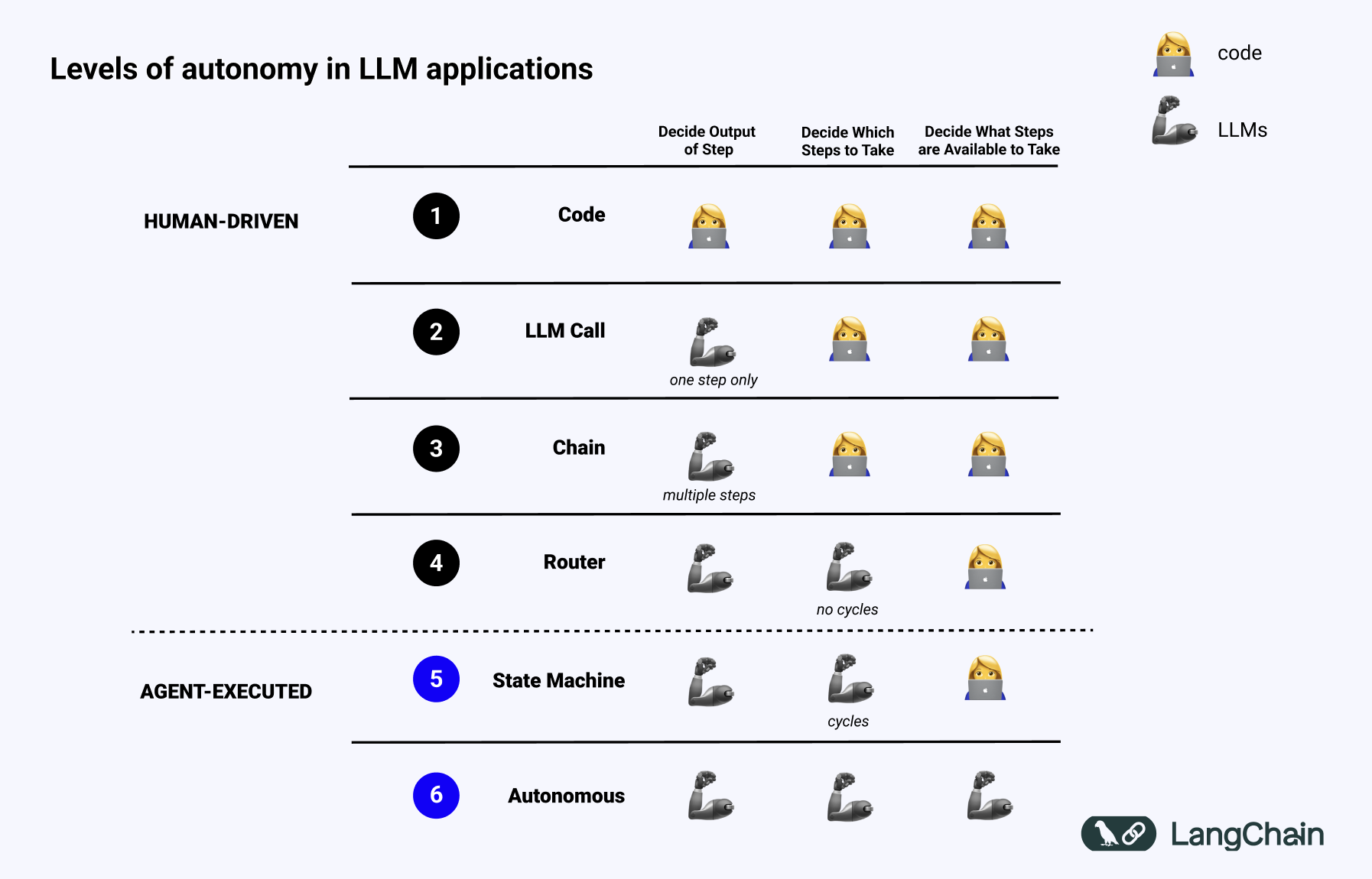
A workflow follows predefined paths -- the developer decides the control flow. An agent uses an LLM to decide what to do next.
Our agent sits at level 2 -- an Orchestrator-Worker pattern. A router classifies intent, then delegates to specialised workers (SQL generation, execution, analysis). We define the paths; the LLM picks which one.
Full autonomy (level 3) would be overkill here. We want deterministic tools orchestrated by an LLM that understands context.
Architecture
Request flow:
- User sends a question to FastAPI.
- Conversation history is loaded from Redis.
- The router classifies intent -- data question, follow-up, or general.
- For data questions: SQL generator -> executor -> analyst -> responder.
- Updated conversation is persisted back to Redis.
Why These Frameworks?
LangGraph
LangGraph -- stateful, multi-step agent workflows as directed graphs.
- Conditional routing -- the router branches to entirely different paths based on LLM classification. Plain chains cannot do this.
- Shared state --
AgentStatecarries messages, SQL, results, and analysis across nodes without globals. - Loop-back -- the analyst can request more data and route back to the SQL generator.
FastAPI
FastAPI -- async Python web framework built on Starlette and Pydantic.
- Native async for non-blocking DB calls and streaming.
- Auto-generated OpenAPI docs from Pydantic models.
- SSE streaming via
sse-starlettefor token-by-token responses.
Redis
Redis -- in-memory data store.
Two use cases:
- Conversation history -- keyed by
conversation:{id}, 24h TTL. - Query cache -- keyed by SHA-256 of the SQL, 5min TTL. Avoids re-executing expensive queries during iterative analysis.
Sub-millisecond reads. Automatic expiry. No cleanup jobs.
LiteLLM
LiteLLM -- proxy server providing a unified OpenAI-compatible API for 100+ LLM providers.
The agent talks to http://litellm-proxy:4000/v1. Whether that routes to GPT-4.1, Claude Sonnet, or local Ollama is purely config. Also gives you spend tracking, rate limiting, and fallbacks for free.
For Rust setups, litellm-rs provides a similar interface with lower overhead.
MCP
Model Context Protocol -- standardised protocol for connecting AI models with tools.
Define tools once via MCP, any compatible client can discover and use them. No per-client integration work.
Implementation
Docker Compose + LiteLLM
Four services:
services:
  litellm-proxy:
    image: ghcr.io/berriai/litellm:main-latest
    ports:
      - "4000:4000"
    volumes:
      - ./litellm/config.yaml:/app/config.yaml
    command: ["--config", "/app/config.yaml"]
    env_file: .env
    healthcheck:
      test: ["CMD", "curl", "-f", "http://localhost:4000/health"]
      interval: 10s
      timeout: 5s
      retries: 5

  redis:
    image: redis:7-alpine
    ports:
      - "6379:6379"

  postgres:
    image: postgres:16-alpine
    environment:
      POSTGRES_DB: ecommerce
      POSTGRES_USER: postgres
      POSTGRES_PASSWORD: postgres
    volumes:
      - ./db/init.sql:/docker-entrypoint-initdb.d/init.sql

  agent-api:
    build: .
    ports:
      - "8000:8000"
    env_file: .env
    environment:
      LITELLM_BASE_URL: http://litellm-proxy:4000/v1
      REDIS_URL: redis://redis:6379/0
      DATABASE_URL: postgresql+asyncpg://postgres:postgres@postgres:5432/ecommerce
    depends_on:
      litellm-proxy:
        condition: service_healthy
      redis:
        condition: service_started
      postgres:
        condition: service_started
LiteLLM config with multiple providers:
model_list:
  - model_name: gpt-4.1
    litellm_params:
      model: openai/gpt-4.1
      api_key: os.environ/OPENAI_API_KEY

  - model_name: claude-sonnet
    litellm_params:
      model: anthropic/claude-sonnet-4-5-20250929
      api_key: os.environ/ANTHROPIC_API_KEY

  - model_name: claude-haiku
    litellm_params:
      model: anthropic/claude-haiku-4-5-20251001
      api_key: os.environ/ANTHROPIC_API_KEY
Dockerfile uses uv for dependency management:
FROM python:3.12-slim
COPY --from=ghcr.io/astral-sh/uv:latest /uv /uvx /bin/
WORKDIR /code
COPY pyproject.toml .
RUN uv sync --no-dev --no-install-project
COPY app/ app/
CMD ["uv", "run", "uvicorn", "app.main:app", "--host", "0.0.0.0", "--port", "8000"]
Database Schema
E-commerce database -- customers, products, and ~200 orders spanning 6 months:
CREATE TABLE customers (
    id SERIAL PRIMARY KEY,
    name VARCHAR(100) NOT NULL,
    email VARCHAR(150) UNIQUE NOT NULL,
    segment VARCHAR(20) NOT NULL
        CHECK (segment IN ('enterprise', 'mid-market', 'startup', 'consumer')),
    region VARCHAR(30) NOT NULL,
    created_at TIMESTAMP DEFAULT NOW()
);

CREATE TABLE products (
    id SERIAL PRIMARY KEY,
    name VARCHAR(150) NOT NULL,
    category VARCHAR(50) NOT NULL,
    price NUMERIC(10, 2) NOT NULL
);

CREATE TABLE orders (
    id SERIAL PRIMARY KEY,
    customer_id INTEGER REFERENCES customers(id),
    product_id INTEGER REFERENCES products(id),
    quantity INTEGER NOT NULL CHECK (quantity > 0),
    total_amount NUMERIC(12, 2) NOT NULL,
    ordered_at TIMESTAMP NOT NULL
);
Agent State + LangGraph Workflow
The state carries context across all nodes:
from typing import Annotated, TypedDict
from langgraph.graph.message import add_messages

class AgentState(TypedDict):
    messages: Annotated[list, add_messages]
    intent: str  # "data_question" | "follow_up" | "general"
    sql: str
    query_results: list[dict]
    analysis: str
    conversation_id: str
The graph wires everything together. The LLM client points at LiteLLM -- the agent has no knowledge of which provider is serving completions:
from functools import partial
from langchain_openai import ChatOpenAI
from langgraph.graph import END, StateGraph
from app.agent.nodes import (
    analyst_node, query_executor_node, responder_node,
    router_node, sql_generator_node,
)
from app.agent.state import AgentState
from app.config import settings


def _route_by_intent(state: AgentState) -> str:
    intent = state.get("intent", "general")
    if intent == "data_question":
        return "sql_generator"
    if intent == "follow_up":
        return "analyst"
    return "responder"


def build_graph(db_session, redis_client) -> StateGraph:
    llm = ChatOpenAI(
        base_url=settings.litellm_base_url,
        api_key=settings.litellm_master_key,
        model=settings.litellm_model,
        temperature=0,
    )
    graph = StateGraph(AgentState)

    graph.add_node("router", partial(router_node, llm=llm))
    graph.add_node("sql_generator", partial(sql_generator_node, llm=llm))
    graph.add_node("query_executor", partial(
        query_executor_node, db_session=db_session, redis_client=redis_client,
    ))
    graph.add_node("analyst", partial(analyst_node, llm=llm))
    graph.add_node("responder", partial(responder_node, llm=llm))

    graph.set_entry_point("router")
    graph.add_conditional_edges("router", _route_by_intent)
    graph.add_edge("sql_generator", "query_executor")
    graph.add_edge("query_executor", "analyst")
    graph.add_edge("analyst", "responder")
    graph.add_edge("responder", END)

    return graph.compile()
SQL Tool
Read-only enforcement, keyword blocklist, and automatic row limits:
FORBIDDEN_PATTERN = re.compile(
    r"\b(INSERT|UPDATE|DELETE|DROP|ALTER|CREATE|TRUNCATE|GRANT|REVOKE|EXEC)\b",
    re.IGNORECASE,
)

def _validate_sql(sql: str) -> str:
    stripped = sql.strip().rstrip(";")
    if not stripped.upper().startswith("SELECT"):
        raise ValueError("Only SELECT queries are permitted.")
    if FORBIDDEN_PATTERN.search(stripped):
        raise ValueError("Query contains forbidden keywords.")
    return stripped

async def query_database(sql, session, redis_client=None) -> list[dict]:
    validated = _validate_sql(sql)

    if redis_client:
        key = f"sql_cache:{hashlib.sha256(validated.encode()).hexdigest()}"
        cached = await redis_client.get(key)
        if cached:
            return json.loads(cached)

    limited = f"{validated} LIMIT {settings.sql_row_limit}"
    result = await session.execute(text(limited))
    rows = [dict(row._mapping) for row in result.fetchall()]

    if redis_client and rows:
        await redis_client.setex(key, settings.query_cache_ttl, json.dumps(rows, default=str))
    return rows
Redis Memory
async def load_conversation(client, conversation_id: str) -> list[dict]:
    data = await client.get(f"conversation:{conversation_id}")
    return json.loads(data) if data else []

async def save_conversation(client, conversation_id: str, messages: list[dict]) -> None:
    await client.setex(
        f"conversation:{conversation_id}",
        settings.conversation_ttl,
        json.dumps(messages, default=str),
    )
FastAPI Routes
@router.post("/chat", response_model=ChatResponse)
async def chat(
    request: ChatRequest,
    db_session=Depends(get_db_session),
    redis_client=Depends(get_redis),
):
    history_data = await load_conversation(redis_client, request.conversation_id)
    history = [
        HumanMessage(content=m["content"]) if m["role"] == "human"
        else AIMessage(content=m["content"])
        for m in history_data
    ]

    agent = build_graph(db_session, redis_client)
    result = await agent.ainvoke({
        "messages": history + [HumanMessage(content=request.message)],
        "intent": "", "sql": "", "query_results": [],
        "analysis": "", "conversation_id": request.conversation_id,
    })

    all_messages = result["messages"]
    await save_conversation(redis_client, request.conversation_id,
        [{"role": "human" if isinstance(m, HumanMessage) else "ai", "content": m.content}
         for m in all_messages])

    ai_response = next(
        (m.content for m in reversed(all_messages) if isinstance(m, AIMessage)),
        "I could not generate a response.",
    )
    return ChatResponse(response=ai_response, conversation_id=request.conversation_id,
                        sql=result.get("sql") or None)
MCP Server
Expose tools for external clients:
@server.list_tools()
async def list_tools() -> list[Tool]:
    return [
        Tool(name="query_database",
             description="Execute a read-only SELECT query against the e-commerce database.",
             inputSchema={"type": "object",
                          "properties": {"sql": {"type": "string"}},
                          "required": ["sql"]}),
        Tool(name="analyse_results",
             description="Compute summary statistics over data rows.",
             inputSchema={"type": "object",
                          "properties": {"rows": {"type": "array", "items": {"type": "object"}}},
                          "required": ["rows"]}),
    ]
Connect from Claude Desktop or Cursor:
{
  "mcpServers": {
    "data-agent": {
      "command": "python",
      "args": ["-m", "app.mcp.server"]
    }
  }
}
Running It
git clone https://github.com/p-s-vishnu/data-agent.git
cd data-agent
cp .env.example .env
# Add your LLM API key to .env

docker compose up --build
Test:
curl -X POST http://localhost:8000/api/chat \
  -H "Content-Type: application/json" \
  -d '{"message": "What are the top 5 products by revenue?", "conversation_id": "demo-1"}'
Follow-up (tests memory):
curl -X POST http://localhost:8000/api/chat \
  -H "Content-Type: application/json" \
  -d '{"message": "Break that down by customer segment", "conversation_id": "demo-1"}'
API docs at http://localhost:8000/docs.